

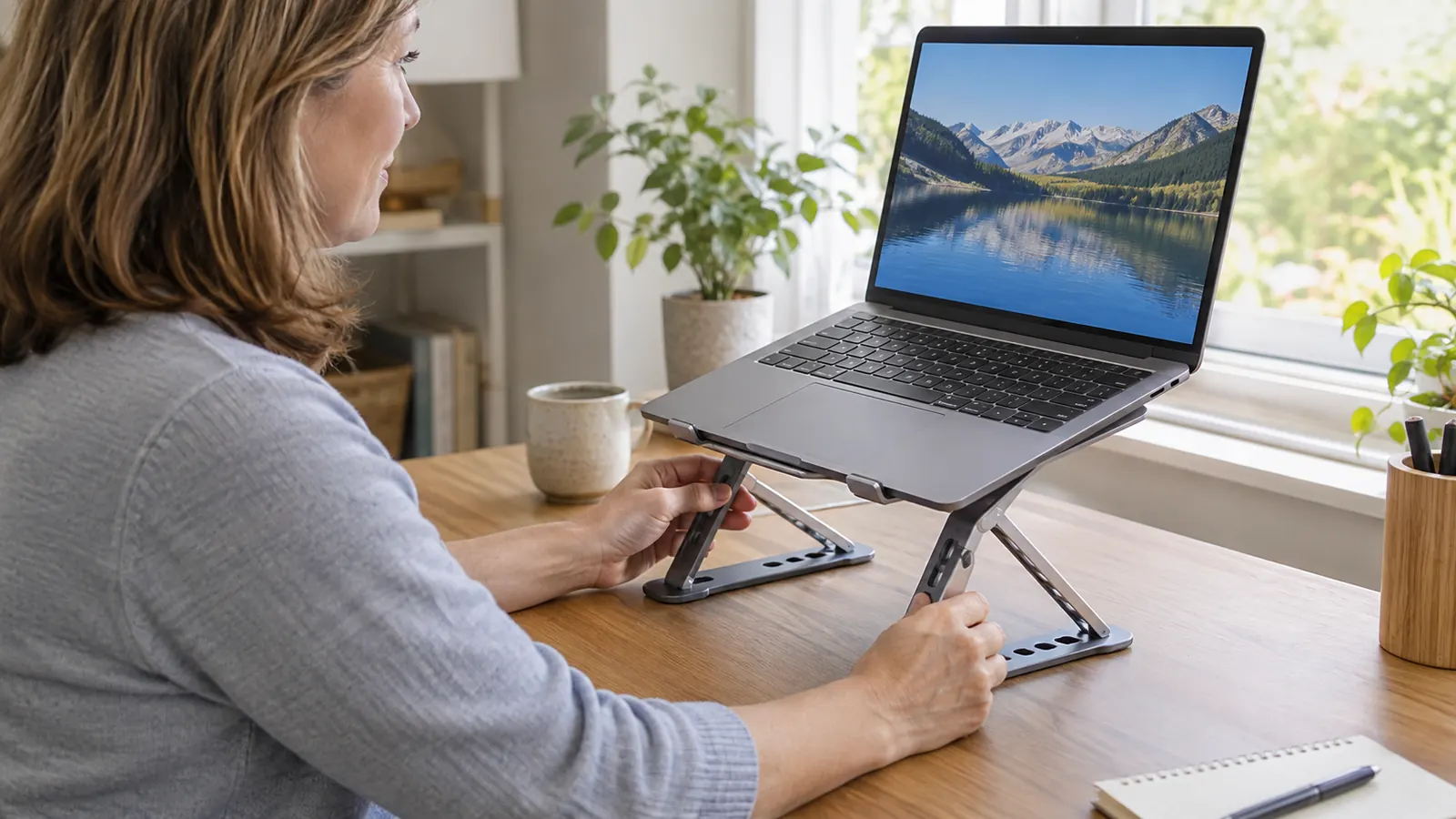
By two in the afternoon, I could feel it between my shoulder blades: that tight, hot spot that showed up after a lifetime of leaning over patients and, more recently, over a laptop on a desk that sat six inches too low. I spent 26 years as a dental hygienist, so I know exactly what it feels like to work with your head pitched forward. When I started doing more writing at home, I was doing the same thing to myself for free. The Nulaxy laptop stand was my attempt to stop.
I did not expect much. I had tried a stack of hardcover books, which wobbled, and a cardboard box, which sagged. I had also tried simply being disciplined about sitting up straight, which lasted until about the third sentence of any email. Eight months later, the Nulaxy stand is still on my desk, still holding my 15-inch Dell at a height that keeps my head over my shoulders instead of hanging off the front of my neck.
The Quick Verdict
Raises a laptop to eye level, folds flat for the car, and has held up through eight months of daily use. It will not fix your posture by itself, and you will want a separate keyboard, but it does the one job I needed it to do.
Amazon Check Today's Price →Eight months in, it still earns its spot on my desk
If you spend your evenings hunched over a laptop screen, this is the fix that actually stuck for me. It folds flat, holds steady, and gets the screen to a height your neck will thank you for.
Amazon Check Today's Price on Amazon →How I've Used It
The setup is not fancy. I work three days a week at a front desk in Columbus, and the rest of my writing life happens in a small spare bedroom on a desk that was never really designed for a laptop. Most mornings I set my laptop on the Nulaxy stand, click the height up two notches, and get to work.
I use it for the usual things: paying bills, writing long emails, and a little bit of work I bring home from the front desk. On the days I am not at the desk, I leave the stand folded against the wall, which is exactly why I wanted one that folds flat. It takes about ten seconds to loosen, fold, and tuck into a tote bag.
The other place it gets used is my daughter's kitchen table in Cincinnati. I drive down in my 2016 CR-V a couple of times a month, and the stand rides in a tote bag on the passenger seat. Two hours of highway driving is exactly the kind of thing that makes my neck stiff, so being able to set up a proper screen height at her table matters more than it sounds. I usually set it up the night before so the table is ready for work first thing.
What Eight Months of Daily Use Taught Me
The first thing I noticed was how much less I thought about my neck. That sounds like a small thing, but it is the whole point. When the screen sits at eye level, your head stays stacked over your spine, and you stop doing the little forward lurch that makes the muscles between your shoulder blades work overtime. I am not a doctor and I am not going to pretend this stand cured anything. What I can tell you is that my mid-afternoon shoulder-blade knot shows up later and smaller on the days I use it.
The stand itself has held up better than I expected. The height adjustment still clicks into place the same way it did on day one. Nothing has loosened, nothing wobbles, and the laptop sits flat on the arms without sliding. I have owned a lot of small desk gadgets that developed a wobble within a month. This one has not.
I also appreciate that it does not take over the desk. When I need the surface for something else, I fold it flat and slide it against the wall. Eight months in, that still works exactly the way it did the first week.
The clearest test came on a Saturday when I wrote for three hours straight, something I used to avoid because of the neck stiffness. With the screen at the right height, I stopped at the two-hour mark to stretch because I remembered I should, not because I had to. That is the difference the stand makes.
The Height and Angle Settings
The whole reason I picked this stand over a fixed riser is the adjustment. My desk is one height, my daughter's table is another, and the front desk at work is yet another. Being able to change the height and tilt means I can get the screen right in each place instead of settling for close enough.
There are enough settings that you can dial it in precisely, and the stand holds the angle you set. I keep mine at a height that puts the top of the screen just below eye level and a slight tilt that cuts the glare from the window. It took me maybe two days of fiddling to find the spot, and I have not touched it since except to fold it for travel.
One honest note: it does take a few seconds to adjust, and the first few times you will probably fuss with it. That is the tradeoff for a stand that is adjustable at all. A fixed riser is simpler, but it is only right for one desk.
One thing I did not expect: the tilt matters almost as much as the height. A screen that tilts back slightly cuts the glare from the window behind me and keeps the reflection of the overhead light off the screen. I fiddled with the angle for one evening and then left it alone.
Folding It Flat and Taking It Along
Folding flat was the feature I was most skeptical about. Things that fold often feel flimsy, or they fold once and then never quite go back together. This one folds flat and stays flat. It lives in a tote bag between trips, and it comes out of the bag ready to use.
The Cincinnati trip is the real test. I pack the stand with my laptop, drive two hours, and set it up on my daughter's kitchen table. It takes less than a minute to go from folded to ready, and the height settings are the same in her kitchen as they are in my spare bedroom. That consistency is the quiet win of this design. The stand has made that trip at least a dozen times now, and it has never once needed an adjustment after the ride.
I have also packed it for the occasional weekend away, and it takes up less room in the bag than a folded sweater. That is the whole trick of a foldable design: you do not have to choose between a good setup and leaving the house.
My daughter noticed it the second time I visited. She said I looked less like I was trying to read the table from six inches away. That is the kind of comment you only get from family, and it told me the change was visible from across the room.

What Bugged Me
The biggest thing nobody tells you about a laptop stand: when the screen goes up to eye level, the keyboard goes up with it. If you type at that height for more than a few minutes, your arms will complain. The fix is a separate keyboard and mouse, which I already had from a brief experiment with a fixed riser. If you do not have them, budget for them, because the stand alone will not give you a comfortable typing position. I keep my keyboard and mouse on a slide-out tray under the desk, which gives me a straight line from elbow to keys.
The second thing is that it is not instantly adjustable. You loosen, move, and tighten, and the first few times you will wonder if you are doing it wrong. You are not. It just takes a few seconds, and you get faster at it.
Third, it adds height, which is the point, but it also means the stand will not fit in a slim laptop bag. Folded flat, it is still a stand. I carry it in a tote bag and it is fine, but if you were hoping to tuck it into a briefcase, you will be disappointed.
And I will say the obvious thing: a stand does not fix posture by itself. I still slouch in my recliner at night, and I still have to remind myself to stand up and move during the day. The stand just removed the one part of my setup that was guaranteed to make me hunch.
How It Compares to What I Tried Before
Before this stand, I tried a stack of books, which worked for about a week until the stack shifted. I tried a cardboard box, which sagged in the middle and made the laptop rock. I tried a fixed riser from a big-box store, which was sturdy but wrong for my daughter's table, so it mostly sat in the closet.
The Nulaxy stand is the first thing that actually got used. The adjustability is what did it. Because it works at my desk and at my daughter's table, it never ended up in the closet. That is the difference between a gadget and a tool.
I have also looked at the motorized options that raise and lower with a button. They look nice, but they are heavy, they need a power outlet, and they do not fold into a tote bag. For my setup, the foldable stand was the right call.
If a friend asked me what to buy, I would tell her to start here. Not because it is the fanciest option, but because it is the one you will actually use, and a tool you use is worth more than a tool you admire.
What I Liked
- Raises the screen to eye level, which takes the strain off my neck and shoulders
- Height and angle adjust easily, so it works at my desk, my daughter's table, and anywhere else
- Folds flat and travels well; it rides in a tote bag to Cincinnati and back
- Still stable and rattle-free after eight months of daily use
- Takes up almost no space when folded against the wall
Where It Falls Short
- At full height you will want a separate keyboard and mouse; the built-in keyboard is too high to type on comfortably
- Adjusting the height takes a few seconds and some fiddling at first
- Folded flat, it is still too bulky for a slim laptop bag
- It raises the screen but does nothing about the rest of your posture; you still have to move and stretch
Eight months in, the height adjustment still clicks into place exactly the way it did on day one. I cannot say that about any other piece of desk equipment I own.
Who This Is For
If you work on a laptop at a desk and you have caught yourself leaning toward the screen, this stand is for you. If you split time between a home desk and another desk, or you travel with your laptop and want the same screen height everywhere, the adjustability is worth it. And if you are tired of the stack-of-books approach, this is the thing that replaces it.
I would also say it is for people who are realistic about what a stand can do. It is a tool for a better setup, not a cure for a sore neck. If that is what you are looking for, this is a reasonable place to start, and it is a lot easier than trying to sit up straight through sheer willpower.
One more thing: this stand is also for people who do not want to think about their setup. Once you find the height and angle you like, you set it and forget it. The few seconds it takes to unfold the stand is less time than you will spend repositioning a stack of books every single day.
Who Should Skip It
If you already use an external monitor at eye level, you probably do not need this. If you want a permanent, never-touch-it-again setup, a fixed riser or a monitor arm is simpler. And if you have real neck or back pain, please talk to a physical therapist or a doctor instead of buying a piece of desk equipment and hoping it fixes you. I am not one, and I am not going to pretend a laptop stand is medical advice.
Also, if you type for hours and you are not willing to use a separate keyboard, skip it. At eye level, the built-in keyboard is too high, and you will trade a neck problem for a shoulder problem.
And if your desk is a standing desk that you already raise and lower, you may not need a riser at all. The stand is at its best on a regular desk where the screen would otherwise sit too low. Match the tool to the setup.
The stand I would buy again tomorrow
Eight months of daily use, a dozen trips to Cincinnati, and it still folds flat and holds steady. If your laptop screen sits below eye level, this is the fix that worked for me.
Amazon Check Today's Price on Amazon →